Select vista button by clicking it and change button appearance for normal and mouse over states and set buttons link properties and link target attributes on the "Buttons" tab.
Select submenu's item by clicking it and change submenu's appearance for normal and mouse over states and set submenu's item link properties and link target attributes on the "Submenus" tab.
DHTML SUBMENU TUTORIAL
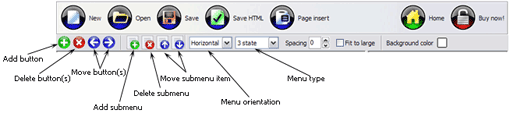
Button builder toolbar
New - to create new project.
Open - to open existing project.
Save - to save current project into the project file (*.xwb).
Save as� - to save current project into the project file (*.xwb) or into the HTML file or to save your project under another name. Choose type from the "File type" list in the "Save as�" dialog.
Page insert - to insert your menu into the existing web-page. "Build the menu into your page" dialog will appear. Click "Browse" button to choose a page you want to insert your menu into. After choosing a page and clicking Ok, the chosen page's HTML code will be opened in the Code field of the dialog.
After that, you can edit your code to prepare the page for the menu insertion. Normally, no coding is required. Then set the cursor to the line you want menu code to be inserted to and click the "Insert" button. The menu code will be inserted into the page. Then you can either save the page or close the dialog without saving by clicking "Save" or "Close" buttons.
Add button - to add website buttons to the menu.
Delete button(s) - to delete selected button(s). Is inactive if no button is selected. Move button(s) - to change selected button's order in the menu. Selected button(s) will be moved one position left/right each time you click one of the Move buttons.
Add submenu's item - to add submenu's item to the menu. Is inactive if no button is selected.
Delete button(s) - to delete selected submenu item(s). Is inactive if no button is selected.
Move submenu's item - to change selected submenu's item order in the menu. Selected item(s) will be moved one position up/down each time you click one of the submenu's item.
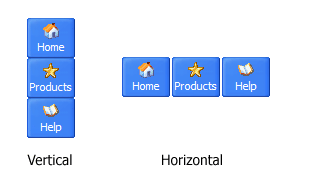
Menu orientation - to select menu orientation (vertical or horizontal). In vertical menu all website buttons are arranged in a column and have the same width. If the menu is horizontal then all its buttons are arranged in a row and have the same height.
Menu type - to select menu type (1-state, 2-state, 3-state and 3-state toggle).
1-state buttons are simple static image buttons. Example:
2-state buttons respond to mouseOver event creating rollover effect. Mouse click doesn't change the button appearance. Example:
3-state buttons support both mouseOver and mouseClick event. Example:
3-state toggle buttons additionally stick in the pressed state after a click. Example:
Spacing - to add space between all buttons.
Fit to large - to make all the menu buttons have the same size. The size will be automatically set to accommodate the biggest text and/or icon in the menu.
Background color - click the square to select Work area's background color.
DESCRIPTION
Good navigation system is an important part of web site success. If people can't find their way around the site, they will rapidly give up looking and go, never to return. So, it's very significant that your website has a neat, fast, and gratifying to the eye navigation. Don't permit your web site visitors to get lost. Try JavaScript Drop Menu!
High Quality and Professional Results
You don�t have to know HTML, JavaScript, CSS or any other coding languages to make multi-state rollover web buttons, professional cross-browser, search engine friendly DHTML menus.
Vista Web Buttons will generate all necessary images, html, javascripts, css styles automatically!
Css Links Tree
Compatibility
Full cross-browser compatibility including IE, Netscape, Mozilla, Opera, Firefox, Konqueror and Safari on Windows, Mac OS and Linux
Search engine friendly
Support for any doctypes
Css Tab Menu Einfach
Dhtml Dropdown Menu Images Dhtml Submenu Tutorial
Compatibility
Full cross-browser compatibility including IE, Netscape, Mozilla, Opera, Firefox, Konqueror and Safari on Windows, Mac OS and Linux
Search engine friendly
Support for any doctypes
RELATED
Submenu With Css Drive Forums [Archive] Horizontal CSS Menus with submenu Submit a DHTML or Tutorial | Pastel color menu with dynamic submenu using CSS. by Carlos Pinho, June 2nd, 2008 css
Best Way - Javascript Menu Tutorial | eHow.com Best Way : Javascript Menu Tutorial. Dynamic HTML, or DHTML, is the technique of combining Pass those functions the corresponding submenu id (for example, Menu 1 will
Menu Scripts Tutorials; Tips and Tricks; Color schemer; Color schemer II; Regex tool; CSS lookup In this DHTML menu script, the submenu slides to left or to the right. The menu is based on an
Ajax Create Submenu Ajax Create Submenu. Make professional DHTML/Java Script Menus for your web site with Drop Down DigitalFamily.com | Dreamweaver Tutorials | Create a Drop Using
Tutorial Javascript Submenu Vertical Template Fade Java Menu Tutorial Javascript Submenu Vertical: Professional Look-n-feel Vertical Menu On Top Of Frame Tutorial; Slide In Dhtml Menus; Treemenu Dynamique
Dreamweaver Menu Tutorial Template Dreamweaver Cs3 Dhtml Menu Tutorial Xp Search Engine Friendly Dreamweaver Menu Tutorial Drop Down Submenu Dreamweaver 8 Templates. Create Buy In Dreamweaver Vista Style 1
JavaScript Tutorial 8 - MultiMedia Tutorial 8 - MultiMedia. MultiMedia adds audio, graphics, video and print presentations. to customize but there are some inflexibilities that are inherent in a non-DHTML
Tutorial Javascript Submenu Vertical Template Fade Java Menu Tutorial Javascript Submenu Vertical: Professional Look-n-feel Vertical Menu On Top Of Frame Tutorial; Slide In Dhtml Menus; Treemenu Dynamique
Menu Tutorials These tutorials were made with GoLive 5, but the concepts should work with other In order to know when to hide the submenu again, there are transparent GIFs placed
Dhtml Menus Horizontal Tutorials Template Creating Dhtml Menu With Submenu; Crear Menus En Java; Create Menu Html; Dropdown Menu Html for Sothink DHTML Menu - Tutorial about how to use DHTML Menu with NetObjects
Dreamweaver Menu Tutorial Template Dreamweaver Cs3 Dhtml Menu Tutorial Xp Search Engine Friendly Dreamweaver Menu Tutorial Drop Down Submenu Dreamweaver 8 Templates. Create Buy In Dreamweaver Vista Style 1
JavaScript Tutorial 8 - MultiMedia Tutorial 8 - MultiMedia. MultiMedia adds audio, graphics, video and print presentations. to customize but there are some inflexibilities that are inherent in a non-DHTML
DhtmlSubmenuDhtmlSubmenu. Help your website visitor find the information with ease with animated gif image!
Web Button Menu Maker Help Document Tutorial: How to create web buttons with MTop Web Button There are three steps to add a DHTML popup submenu to a web button:
How To Create Javascript Drop Menu DhtmlSubmenu Css Create Submenu Horizontal Javascript Menus How To Create Submenu JavaScript Navigation Tutorials and Tips :: Hot Scripts This short tutorial
How To Create Javascript Drop Menu DhtmlSubmenu Css Create Submenu Horizontal Javascript Menus How To Create Submenu JavaScript Navigation Tutorials and Tips :: Hot Scripts This short tutorial
HTML Basix - DHTMLMenu tutorial DHTMLMenu helps you create custom DHTML menus without having to worry about the code behind the menu.
JavaScript Tutorial 8 - MultiMedia Tutorial 8 - MultiMedia. MultiMedia adds audio, graphics, video and print presentations. to customize but there are some inflexibilities that are inherent in a non-DHTML
How To Create Javascript Drop Menu DhtmlSubmenu Css Create Submenu Horizontal Javascript Menus How To Create Submenu JavaScript Navigation Tutorials and Tips :: Hot Scripts This short tutorial